

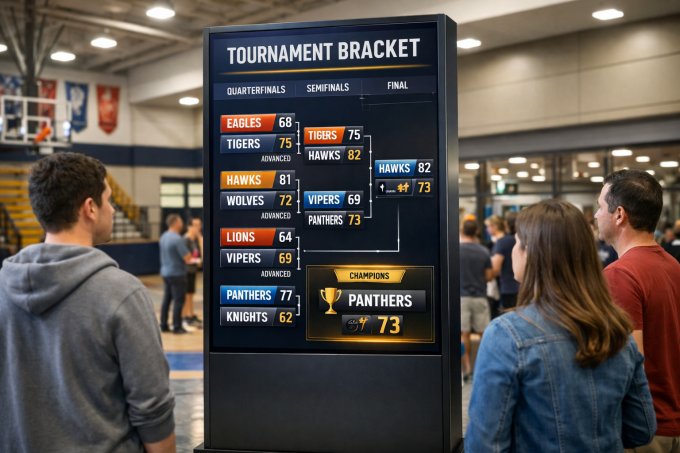
In the past, a digital scoreboard was something you would only see in professional sports arenas. Large leagues had the budgets, infrastructure, and technical teams needed to operate scoreboard systems.
Today, things are very different.
With modern digital scoreboard software and digital signage platforms, any organization can create and display a scoreboard on screens. Whether it is a school tournament, a university competition, a sports club event, or even a workplace challenge, displaying results in real time has become easy and affordable.
Instead of using paper sheets or whiteboards, results can now be shown on digital screens across the venue.
In this article we will explain:
- How to display a digital scoreboard
- How to build a scoreboard system yourself
- Why digital scoreboards are becoming popular in schools, sports clubs, and workplaces
What Is a Digital Scoreboard?
A digital scoreboard is a screen that displays live scores, rankings, or tournament progress.
A scoreboard display may include information such as:
- Game results
- Team rankings
- Tournament brackets (quarter finals, semi finals, finals)
- League tables
- Player statistics
Instead of manually updating a whiteboard or printed bracket, the results are displayed on a digital score board that updates automatically.
Digital scoreboards can be installed in many locations, including:
- Schools
- Universities
- Sports clubs
- Community centers
- Company offices
- Cafeterias or lobby areas
- The goal is simple: make results visible, engaging, and easy to follow for everyone.
How to Display a Scoreboard on Screens
Using digital signage software like NoviSign, you can easily display a scoreboard on any screen.
The system works through a playlist that runs on the display. Inside that playlist you can show different types of content, such as:
- announcements
- event schedules
- internal communications
- and the scoreboard
The scoreboard can appear either:
- full screen
- or as part of a layout together with other information.
For example, a sports club might display a playlist that includes:
- welcome messages
- upcoming matches
- tournament progress
- the current scoreboard
Multiple screens can be installed across the venue so players and visitors can easily follow the competition.
How to Build a Digital Scoreboard
Creating a digital scoreboard system today is surprisingly simple.
With NoviSign digital signage software, the process typically works like this.
Step 1 – Create a Scoreboard Template
Inside NoviSign Studio, create a layout that displays the competition information.
For example:
- team names
- scores
- ranking tables
- tournament brackets
These elements are placed on the screen as data fields or labels.
Step 2 – Connect the Template to Data
The scoreboard template can be connected to a data source.
Common options include:
- Excel spreadsheets
- Google Sheets
- JSON data sources
- custom applications
Each field in the design (team name, score, ranking) connects to a column in the data table.
Step 3 – Update the Scores
The people managing the competition only need to update the scores in the spreadsheet.
For example, they update the results in Google Sheets.
Within seconds, the digital scoreboard updates automatically on the screens.
No manual graphic editing is required.
Digital Scoreboard for Schools, Sports Clubs and Offices
Today, many organizations run internal competitions and tournaments. These may include sports events, company challenges, school leagues, or university tournaments.
In the past, tracking results meant using printed sheets or whiteboards that had to be manually updated after every game.
With a digital scoreboard, results can now be displayed automatically on screens across the venue.
Schools can display tournament progress in hallways or gyms.
Sports clubs can show live scores for members and visitors.
Companies can use scoreboards for team competitions, internal leagues, or employee events.
Using digital signage software like NoviSign, organizations can easily create a scoreboard layout and connect it to a simple data source such as Google Sheets or Excel.
When the organizer updates the scores in the spreadsheet, the scoreboard on the screens updates automatically, allowing everyone to follow the competition in real time.
This approach allows any organization to create a professional scoreboard display without needing complex or expensive stadium equipment.
Real-World Example: A Digital Scoreboard Case Study
A great real-world example of a digital scoreboard built with digital signage software was implemented during the Total Tech Summit, where participants competed in a cornhole tournament.
The organizers wanted an easy way to display tournament progress and scores across multiple screens in the venue. Instead of using printed brackets or manual whiteboards, they built a live digital scoreboard powered by NoviSign.
The scoreboard displayed the tournament structure, including team names, matchups, and winners as the competition progressed.
Behind the scenes, the tournament staff simply updated the scores in a Google Sheets spreadsheet, and the scoreboard automatically updated on the screens in real time.
You can read the full case study here: https://www.novisign.com/blog/signage/cornhole/
This real-world project shows how easy it is to build a DIY digital scoreboard using digital signage software and Google Sheets.
From Whiteboards to Digital Scoreboards
For many years competitions were managed using paper sheets or manual whiteboards.
Someone had to erase and rewrite the results after every game.
With a digital scoreboard system, this process becomes automatic.
Once the data is updated, the screens immediately reflect the new standings.
This creates a much more engaging experience for players and spectators.
Final Thoughts
You no longer need to be a professional sports league to use a digital scoreboard.
With modern digital signage platforms like NoviSign, any school, university, sports club, or workplace can create a live scoreboard display.
Simply connect a screen, create a scoreboard template, and link it to a spreadsheet.
Update the scores once — and the results will automatically appear on every screen.